A different pattern. A separate vault.
Draw on a 5×5 grid to open your space. Each pattern addresses its own vault, with no cross-vault list on the unlock screen. A new pattern opens an empty space.
Learn about patterns
For iPhone · Coming to the App Store
Keep photos, videos, documents and notes in encrypted vaults. Open each space with its own pattern.
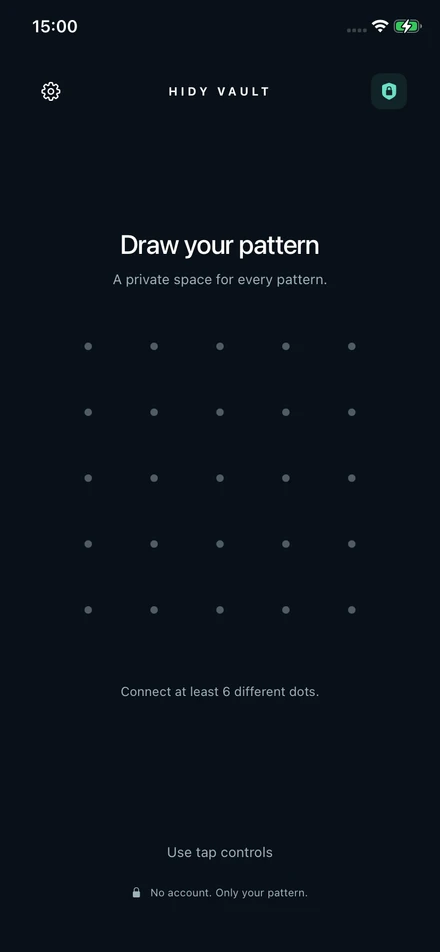
Hidy Vault brings your private files together without adding another account to manage.
Draw on a 5×5 grid to open your space. Each pattern addresses its own vault, with no cross-vault list on the unlock screen. A new pattern opens an empty space.
Learn about patternsImport photos, videos and documents. Create folders and write notes inside the vault. File names, thumbnails and contents are encrypted.
Take photos or videos inside Hidy and save them directly to your vault. After importing from Photos, you can choose whether to delete the originals.
Create a 12-word recovery phrase for each vault. Keep it somewhere safe so you can restore a backup or recover access if you forget the pattern.
Understand recoverySave an encrypted backup file or enable iCloud backup. Pro adds device sync and shared vaults, with invitations you send privately.
Invite someone to a vault and revoke future sharing access when needed. Files already downloaded, exported or copied by a recipient remain theirs.
How vault sharing worksThree familiar actions. No sign-up form.
Connect at least six different dots. Remember both the pattern and the grid you used.
Import from Photos or Files, use the camera, or create a note. Organize your files into folders.
Tap Lock when you are done. Hidy also locks when it goes into the background.
Hidy uses AES-256-GCM to protect file contents and vault metadata on your device. Optional cloud copies are encrypted before upload.
Read how Hidy protects your filesFree includes 3 vaults, each with up to 100 photos and 10 videos, plus documents, notes, recovery and backups.
Per week. Renews until cancelled.
Choose weeklyPer year. A 7-day trial is offered to eligible customers. Renews until cancelled.
Choose annualOne payment. No recurring subscription.
Choose lifetimeWeb prices shown in USD. Taxes and final terms appear at checkout. Web purchases are handled by Polar and deliver a license key by email for activation in Hidy Vault. Public App Store availability is coming; these links are for the web license. App Store prices and availability may differ.
| Feature | Free | Pro |
|---|---|---|
| Vaults | 3 | Unlimited |
| Photos and videos per vault | 100 photos, 10 videos | Unlimited |
| Documents, notes, recovery and backups | Included | Included |
| Device sync and vault sharing | Not included | Included |
| Decoy vault and alternate app icons | Not included | Included |
A decoy vault is an optional destructive feature: drawing its configured pattern permanently removes the other local vaults. Read the warning in the app before enabling it.
Hidy stores imported files in its own encrypted vault. It does not simply hide items in the Photos app. Originals remain in Photos unless you choose to delete them, and deleted Photos items can remain in Recently Deleted.
A saved recovery phrase can restore access to that vault. Without the pattern or a valid recovery phrase, we cannot reset access or decrypt the vault for you.
Use an encrypted backup file or an iCloud backup together with the vault's recovery phrase. Saving the phrase is essential; knowing the pattern alone is not a replacement for that backup recovery process.
No Hidy account is required to use a local vault. Optional iCloud features use your Apple account. Apple or Polar processes purchases and license checks.
You can revoke future vault sharing access, but the recipient retains downloaded or exported copies. Share only with people you trust.
Hidy Vault is built for iPhone running iOS 16 or later. Public App Store release is coming. There is no public iPhone download link yet.
The Hidden album, a locked Photos app or an encrypted vault: what each one protects.
Read the guide →Patterns, imports, folders and locking, explained in plain language.
Read the guide →Understand your recovery phrase, encrypted backups and moving to a new iPhone.
Read the guide →Invite someone to one vault and know what revoking access does.
Read the guide →